NewResilience, Continuity, the Pro levels and Agentic Verification: from safekeeping to proof you can recover.The new line-up is here.See what's new
The project manager briefing, in the shared briefing structure. Same hero, six-phase tracker (phase 4 marked "Your part") and section order as the other five. A project manager says yes to a plan they can run: who does what, what to prepare, and how setup reaches a first certificate. Those are the three topics. Production's page ("Codekeeper Platform Setup and Configuration Guide") is the most concrete of the six, so its steps are kept almost in full, in the new vocabulary: "configure your escrow settings" becomes the agreement and settings for each protection.
Briefing · Project managers

Six phases, six teams. One setup you can run.

This briefing covers what a project manager needs to run the setup: who leads each phase, what to prepare before you start, the account setup steps, and how deposits reach a first certificate.

  • Trusted by 3,500+ teams
  • ISO/IEC 27001:2022 certified
  • Guided setup, step by step
Topic 1: who does what, across the whole setup. This is the project manager's real job, so it comes first. Each card is one phase from production's tracker, with the team that leads it and a link to that team's briefing, so a project manager can forward the right page to the right person. The phase summaries come from production's checklists, in the new vocabulary. The project manager's own card jumps to the steps further down this page. 16 Oct: Continuity Pro added; the first rebuild now comes "with a Pro level", since base Continuity no longer includes Agentic Verification.
Topic 2: what to prepare (production's "Quick tip: Preparation is the fastest way through setup"). The first six items are production's list. The last two are new and follow the model: each application needs a protection, and Continuity maps the live environment at setup (MESSAGING §6), so someone who knows the accounts and services has to be available. "Storage region" is production's; a choice of hosting region is still on the to-confirm list. The deadline tip is production's. The screenshot is production's (briefing_select_escrow_structure.webp): old UI, replace when the new UI ships. I couldn't open it from here, so check it shows no Validated, Verified or Certified labels, old product names or prices before launch.

2 · Before you start

Prepare once, and setup moves fast.

The platform shows you what to do at each step. Having these ready means nobody waits on an email.

  • Your organisation's details: name, address and registration information
  • Contacts for everyone on your side who needs platform access
  • The other party's organisation and contact details, for their invitations
  • The names of your authorised representatives
  • Your technical preferences, such as storage region and notifications
  • Whether you're the depositor or the beneficiary
  • The protection for each application: Escrow, Resilience or Continuity
  • For Continuity: someone who knows where the application runs and the accounts and services it depends on
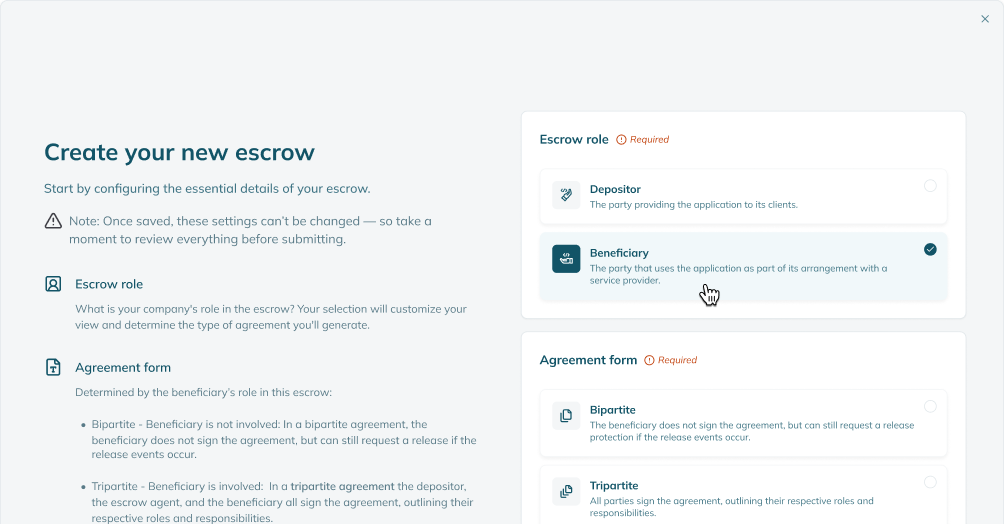
Choosing your role and the agreement structure in the Codekeeper app
Choosing your role and the agreement structure in the app.
Working to a deadline? Start setup early. Legal reviews between parties can take longer than expected, especially when several teams are involved.
Topic 3: deposits, from signature to first certificate. A project manager needs to know when the setup is "done". Production ends at "Activate the escrow"; in the new line-up, done is a Software Resilience Certificate, and with a Pro level a first Recoverability Certificate. "Deposits open once the agreement is signed" is production FAQ text. Integrations, daily sync and manual uploads are production claims (flagged in to-confirm). The mock uses fictional names and example states. 16 Oct: Continuity Pro added; step 4 now says "with a Pro level", since base Continuity no longer includes Agentic Verification.

3 · Deposits

From a signed agreement to a first certificate.

1

Deposits open

Once every party has signed the agreement, your tech team can start depositing.

2

Connect or upload

They connect repositories through an integration, synced daily, or upload compressed files.

3

Tag and activate

Each deposit is tagged by type and activated. We run an automated check and issue the Software Resilience Certificate.

4

First rebuild, with a Pro level

Start a rebuild when the deposit is complete. A successful run issues a Recoverability Certificate.

Production's six account setup steps and checklists, in the shared table. The rows are production's ("Create your account", "Add your team members", "Select your role and escrow type", "Provide party information", "Set up technical configurations", "Hand off to legal team"), with production's "Our key responsibilities" on the right. Production describes a two-party (bipartite) setup as needing "the other party's information on hand", while our FAQ describes a two-party agreement as one between the vendor and Codekeeper. Fact-check, 7 Oct: step 3 now lists multi-party too, because the FAQ and the legal briefing offer three structures and say they're chosen during account setup; production's own step names only bipartite and tripartite. Onboarding should confirm how party details work for each structure, and whether storage location, display permissions and version history access are still the settings offered.

Your steps, and ours

Account setup, step by step.

After sign-up, you'll get an email with setup details. From there, the platform guides each step.
Your part
What Codekeeper does
1 · Create the account
Watch for the onboarding email, create the account and add your organisation's legal and administrative details.
Sends the setup details and gives you access.
2 · Invite your team
Invite the legal, compliance and technical people who'll take part in later phases.
Helps manage user access and invitations.
3 · Choose role and structure
Confirm whether you're the depositor or the beneficiary, and choose the agreement structure: two-party, three-party or multi-party.
Explains each option and what it means for your protection.
4 · Add party details
Add your official contacts and signatories. On a three-party agreement, we invite the other party to add their own.
Invites the other party and shows what's still missing.
5 · Configure settings
Set storage location, display permissions, notifications and version history access, and align with the other party on a three-party agreement.
Walks you through each configuration option.
6 · Hand over to legal
Tell your legal team setup is complete, and send them the legal briefing.
Our legal team prepares the agreement draft with them.
The page-specific offer on educational pages. Agreed 7 Oct: on explainers, video guides, magazine articles and role briefings, the mid-page offer is the matching guide instead of the sample evidence pack. Visitors who are still learning convert better on a guide about their question. The hero and closing section still carry Book a demo and Get the sample evidence pack. Guide source on production: the "resources-deposit-setup-overview" item on /resources. Before launch: update the guide itself to the October line-up (it still uses the old product names and verification tiers) and connect this form to the HubSpot form that sends it. On the project manager briefing the deposit guide covers the phase the project manager hands to the tech team, so they know what good looks like.
Deposit Setup Overview

Free guide

Deposit Setup Overview

How deposits reach the vault, through integrations or secure upload, and what to deposit for each type of application.

  • Integrations and secure upload, side by side
  • What to deposit for software, SaaS and AI
  • Keeping deposits current without manual work
Enter your work email.
Enter your company.

Check your inbox.

The guide is on its way. (Example only: this kit sends nothing.)

The questions that stall a setup. The setup time is production FAQ text and stays flagged until onboarding confirms it. The deposit, depositor and three-party answers are production FAQ answers, reworded. No answer promises a timeline for the other party.

Questions

Keeping setup on track.

How long does setup take?

Once your teams are involved, setup usually takes one to two weeks, depending on your internal response times. The legal review between parties is the step most likely to take longer.

Are we the depositor or the beneficiary?

If you supply the software, you're typically the depositor. If you rely on it, you're typically the beneficiary. Not sure? Ask us before you choose.

Who should we invite?

Everyone who'll take part in a later phase, usually legal, compliance and technical stakeholders. You can invite them from the dashboard at any time.

What does the other party need to do?

On a three-party agreement, we invite them to add their own details, and they log in to approve the agreement before signatures go out. Their details appear in the agreement once they've accepted the invitation and completed onboarding.

Why can't we deposit yet?

Deposits open once the agreement is signed. Check that every agreement step is complete, including approvals and signatures.

The people, the rest of the set, and the booking route for this role. Production's project manager briefing shows Eric (Account Manager, Sales), Robyn (Account Support, Customer Success) and Sam (Tech Support, Customer Success; the photo file is "Sam Hofmeyr"), with photos by absolute URL. Before launch, confirm with each person that they agree to appear, that the role is current and that the photo is recent. Names are flagged until then. The project manager's route is the onboarding call, the call production offers to activate a new account.

Your Codekeeper team

Who'll help you run it.

One contact for each kind of question, so nothing waits in a shared inbox.

Eric, account manager at Codekeeper

Account manager · Sales

Eric

Scope changes, more applications and anything in the proposal.

Book a demo
Robyn, account support at Codekeeper

Account support · Customer Success

Robyn

Account setup, invitations and settings.

Book a support briefing
Sam, tech support at Codekeeper

Tech support · Customer Success

Sam

Integrations, deposits and the first rebuild, with your tech team.

Book a technical briefing

Brief the rest of your team

Book your onboarding call.

We'll activate the account with you, configure it for your applications and show you where everything is.

Book an onboarding call
The same close on every page. The project manager briefing closes on the setup this reader is running. Every page ends on the same two actions in the same order: Book a demo, then the sample evidence pack.

A setup you can run, with help at every phase.

See the platform on a demo, or get the sample evidence pack to see what your setup produces.

Chat widget goes here. Production runs HubSpot chat in this corner. Keep it on launch: it catches visitors with a quick question who won't book a demo yet. Route it to sales during office hours.